
Your Android home screen does not have to look like a standard grid of icons. Orbit Launcher takes a very different approach by combining a futuristic 3D interface, sci-fi themes, smart app organization, AI voice features, gesture controls, and animated visual effects.
The Android version of Orbit Launcher is designed for users who want a more immersive home-screen experience.
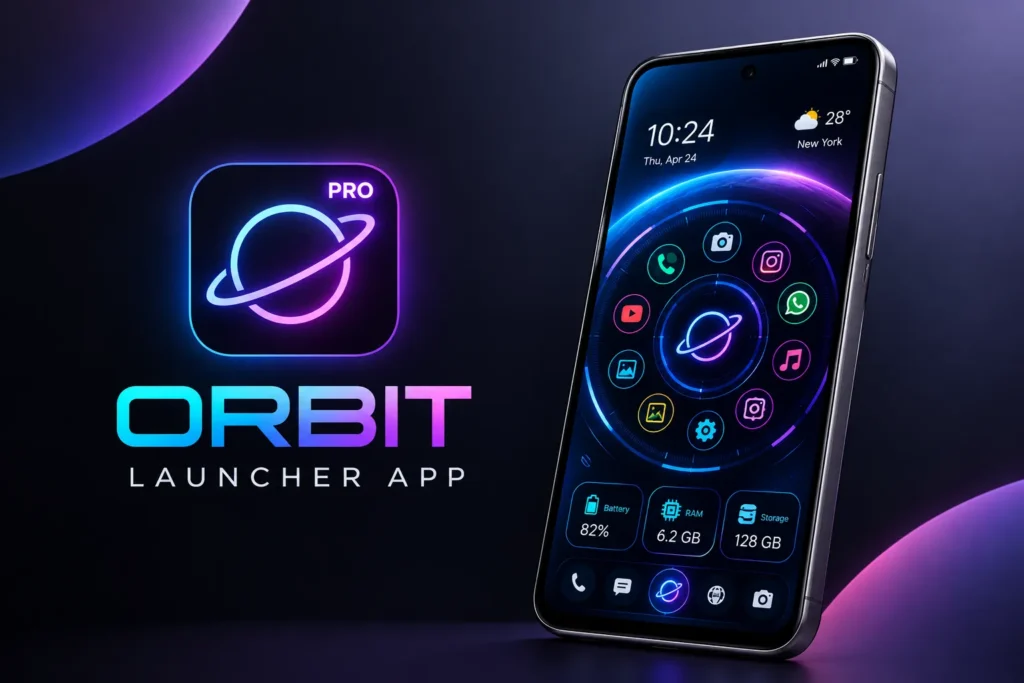
It includes a circular-style app library, customizable themes, parallax wallpapers, system information, app locking, widgets, global search, and an AI voice assistant powered by Gemini. The current Google Play listing shows 50K+ downloads, a 4.6-star rating, ads, and in-app purchases, with the app updated in August 2026.
Instead of simply changing your wallpaper or icons, Orbit Launcher changes the way you interact with your phone.
What Is Orbit Launcher App?
Orbit Launcher is an Android home-screen replacement focused on futuristic and sci-fi-style customization.
The launcher is designed around a 3D HUD-style interface that makes the phone feel more like a futuristic command center. Alongside the visual design, it provides several practical tools for searching, organizing, securing, and accessing applications.
Some of its main features include:
- 3D sci-fi themes
- AI voice assistant
- Smart app library
- Parallax wallpapers
- Custom icon packs
- Animated glow effects
- System information overlay
- App lock and hidden apps
- Weather and music widgets
- Global search
- Gesture controls
- Notification badges
This makes Orbit more than a theme pack. It is a complete launcher replacement.
Futuristic 3D Home Screen
The first thing you will notice about Orbit is its futuristic appearance.
Instead of a basic Android home screen, the launcher uses a 3D HUD-inspired design with animated interface elements and sci-fi styling. The goal is to make normal phone navigation feel more cinematic.
The interface can be particularly appealing if you enjoy:
- Sci-fi designs
- Cyberpunk aesthetics
- Futuristic technology
- Gaming interfaces
- Animated Android themes
- 3D visual effects
You can use the launcher as a complete visual transformation rather than simply changing one part of your phone.
AI Voice Assistant
One of Orbit Launcher’s most notable features is its Gemini-powered AI voice assistant.
The current app description says the assistant can be used for tasks such as opening applications, searching the web, reading news, and handling more complex commands through natural conversation.
This means you can interact with the launcher using your voice instead of relying entirely on taps and gestures.
For example, voice controls can be useful when you want to:
- Open an application
- Search for information
- Perform a quick command
- Access information without typing
The exact commands and capabilities can change as the app and underlying AI services are updated.
Smart App Library
Finding an application can become difficult when your phone has hundreds of installed apps.
Orbit addresses this with a Smart App Library that automatically organizes applications into categories such as social, games, and shopping.
Instead of manually creating every folder yourself, the launcher can organize your apps based on categories.
This can make the home screen cleaner while still giving you quick access to a large application collection.
Circular App Organization
Orbit also uses a circular and HUD-style approach to application navigation.
The design creates a more distinctive alternative to a traditional icon grid and gives the launcher a futuristic appearance.
This can be particularly interesting for people who have become bored with conventional Android launchers.
The circular design also works alongside global search, allowing you to search for applications or contacts instead of manually navigating through every icon.
Parallax Wallpapers
Orbit includes gyroscope-based parallax wallpapers.
These wallpapers react to movement from your phone and create a sense of depth as you tilt the device. The developer describes this as a 4D-style visual effect.
The result can make your home screen look more dynamic than a standard static wallpaper.
You can combine the effect with sci-fi themes and animated interface elements to create a more immersive setup.
However, the visual effect depends on your phone’s sensors and the wallpaper you select.
Sci-Fi and Cyberpunk Themes
Themes are another major part of Orbit Launcher.
The launcher provides a library of futuristic HUD and sci-fi backgrounds, and the current description also highlights cyberpunk-inspired designs. Users can choose from available themes or create a customized appearance.
This means you can build a home screen around a specific aesthetic rather than mixing unrelated icons and wallpapers.
Popular combinations might include:
- Cyberpunk wallpaper
- Neon interface effects
- Dark backgrounds
- Futuristic icons
- Glowing highlights
- Sci-fi widgets
The overall design can make your smartphone feel visually very different from the default Android interface.
Custom Icon Packs
Orbit supports third-party icon packs, allowing you to change the appearance of your application icons along with the launcher.
This gives you more control over the overall style.
For example, you can pair a dark sci-fi wallpaper with monochrome icons or use colorful icons with a bright futuristic theme.
Because icon packs are supported, you are not limited to the default visual style provided by the launcher.
Animated Pulsator Glow Effects
Orbit also adds animated glow effects to the interface.
Its Pulsator Glow feature can make colors and visual elements appear to gently pulse, helping the launcher feel more alive.
This effect is particularly suited to futuristic themes because glowing accents are commonly associated with HUD and cyberpunk interfaces.
You can combine glow effects with a dark background to create a stronger contrast.
System HUD Overlay
One of Orbit’s more practical features is the System HUD Overlay.
Instead of only showing decorative graphics, the launcher can display real-time information such as:
- Battery status
- RAM usage
- Storage information
This information can be presented as part of the futuristic dashboard-style interface.
For users who enjoy monitoring device information, this can be a useful addition to the visual theme.
It also helps the launcher feel more like a dashboard rather than simply another collection of icons.
App Lock and Hidden Apps
Orbit also includes basic privacy-oriented customization features.
The launcher allows you to lock applications with a password and hide selected apps from the launcher grid.
This can help keep sensitive or rarely used applications out of your normal interface.
You might use the feature for:
- Private photo apps
- Messaging apps
- Financial applications
- Work tools
- Apps you rarely open
The exact security options can depend on your device and Android version.
Built-In Widgets
Orbit also includes several built-in tools so you do not have to install separate widgets for everything.
The current listing mentions:
- Weather
- Music player
- News feed
- Flashlight
It also supports third-party widgets, which means you can continue using many of the widgets you already rely on.
This gives you a balance between a themed interface and practical information.
Global Search
Orbit includes a global search feature that can search across different parts of your device.
According to its current description, the launcher can search for apps, contacts, and web results directly from the home screen.
This can save time when you know what you want but do not want to navigate through several menus.
For users with a large application library, search may become one of the most frequently used features.
Notification Badges
Orbit also supports notification badges on app icons.
This gives you a visual reminder when applications have unread messages or other pending notifications.
Notification indicators are especially useful in a heavily customized launcher because they allow you to keep the interface looking different without losing important information from your normal Android workflow.
Gestures for Quick Actions
Orbit supports gesture-based controls as part of its launcher functionality.
The app’s accessibility service is used for certain gesture-driven features, including double-tap-to-lock and screenshot shortcuts. The developer states that personal data is not accessed through this service.
Gestures can make it easier to perform common actions without searching through menus.
However, Android’s Accessibility Service is a powerful permission, so it is important to read the permission request carefully before enabling it.
How to Set Up Orbit Launcher
Getting started with Orbit is similar to installing any other Android launcher.
A typical setup process is:
- Install Orbit Launcher.
- Open the application.
- Follow the initial setup instructions.
- Set it as your default launcher.
- Choose a futuristic theme.
- Select a wallpaper.
- Customize icons.
- Configure widgets.
- Set up gestures.
- Enable optional features such as app lock or AI controls.
You can then gradually customize the launcher instead of changing everything at once.
Is Orbit Launcher Free?
Orbit Launcher is available as a free download, but the current Google Play listing shows ads and in-app purchases.
There is also a separate paid Orbit Launcher Prime version that adds additional functionality and is listed as a paid application.
Features, pricing, and premium access can change, so checking the current store information before making a purchase is recommended.
Privacy and Data Safety
Orbit’s developer says the launcher does not collect or sell personal data and explains that its Accessibility Service is used for specific gesture functions.
However, the current Google Play data-safety disclosure says the app may share certain types of information with third parties, including location and app activity, and says the app may collect app activity. Google Play also indicates that data is encrypted in transit.
Because these disclosures can change, review the current Play Store privacy section before installation, particularly if privacy is an important consideration for you.
Performance and Battery Usage
Orbit uses more visual effects than a basic Android launcher, including animations, glow effects, parallax wallpapers, and a 3D-style interface.
That means actual resource usage can vary depending on your smartphone and the number of effects you enable.
On a newer device, the experience may feel smooth, while older hardware may respond differently.
If you notice battery drain or slower performance, consider reducing animations, using a less demanding wallpaper, or disabling effects you do not need.
Who Should Use Orbit Launcher?
Orbit Launcher is mainly designed for users who enjoy futuristic Android customization.
It may be particularly interesting for:
- Sci-fi fans
- Cyberpunk enthusiasts
- Android customization users
- Gaming-style setup enthusiasts
- Users who enjoy animated launchers
- People who want AI controls
- Users who prefer themed home screens
Someone looking for a very simple, traditional Android interface may prefer a more conventional launcher.
Important Things to Know
Orbit Launcher is designed as a complete visual and functional replacement for your Android home screen.
Keep these points in mind:
It changes your default launcher:
Your normal home-screen navigation will be replaced once Orbit is selected as the default.
It uses advanced visual effects:
Parallax, animations, and glow effects can require additional system resources.
Some features require permissions:
Accessibility access is needed for certain gesture functions.
AI features may require internet access:
The Gemini-powered assistant relies on online AI services.
Ads and purchases are available:
The free Android version currently contains ads and in-app purchases.
The experience varies by device:
Android manufacturers can handle widgets, permissions, sensors, and background activity differently.
Final Thoughts
Orbit Launcher App is an interesting Android launcher for users who want to move away from the ordinary home-screen design. Its combination of futuristic 3D HUD visuals, AI voice controls, smart app organization, parallax wallpapers, custom icons, glow effects, system information, widgets, app locking, hidden apps, and global search gives it a distinctly different feel.
The main attraction is its sci-fi-inspired interface. Instead of simply applying another wallpaper, Orbit changes the entire way the Android home screen looks and behaves.
It is particularly suited to users who enjoy futuristic launchers, cyberpunk themes, 3D Android home screens, AI-powered tools, animated wallpapers, and deep customization. At the same time, it is worth checking the permissions, privacy information, and premium features before making it your everyday launcher.
Related Word: Orbti, oibti, Orblt, olbti, Ordit,